

Run the Full PulseRN Debugger in a Browser with One Command
Installing a desktop application should not be the first debugging problem a React Native developer has to solve.
Packaged desktop applications remain useful. They integrate naturally with the operating system, can stay available between terminal sessions, and provide a focused workspace outside the browser. But they also introduce download choices, platform-specific packages, security prompts, and update behavior before a developer can inspect a single event.
That friction matters when someone is evaluating a new tool or needs to debug a problem immediately.
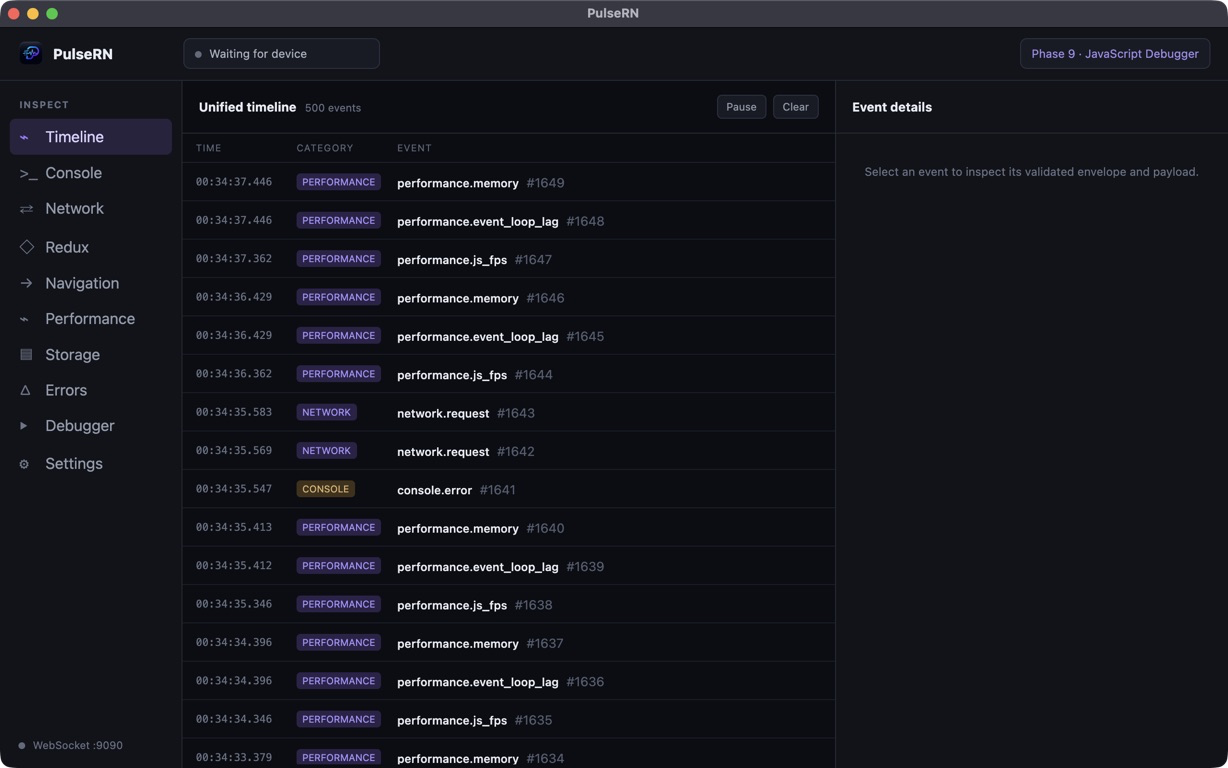
I have added a browser edition to PulseRN so developers with Node.js 22.5 or newer can launch the complete debugger UI with one command:
npx @maahibhama/pulsernPulseRN starts locally, opens an authenticated page in the default browser, receives events from the
React Native SDK, and retains debugging history in SQLite. Keep the terminal open while debugging
and press Ctrl+C when the session is finished.
This is a local debugger, not a hosted dashboard
Section titled “This is a local debugger, not a hosted dashboard”“Run in a browser” can sound like application data is being sent to a website. That is not how the PulseRN CLI works.
The command starts the PulseRN services on the developer’s own computer. By default, the browser
interface is served from http://localhost:3000, the React Native SDK connects on port 9090, and
the Hermes debugger looks for Metro on loopback port 8081.
The browser is the interface. The local CLI process still owns the important boundaries:
- SDK connections and protocol negotiation;
- validation and bounded ingestion;
- SQLite persistence and retention;
- debugger and Metro communication;
- settings and authenticated device pairing;
- browser session authentication;
- clean startup and shutdown.
No PulseRN-hosted account is required. The application events and retained sessions stay on the computer unless the developer deliberately exports or shares them.
Local-first does not mean automatically safe, so the browser edition preserves the same redaction, payload limits, pairing requirements, and trust boundaries as the desktop workflow.
Why I kept the same interface
Section titled “Why I kept the same interface”I did not want to create a simplified “web viewer” that could show logs but lost the deeper debugging workflows.
The browser edition serves the same PulseRN debugger UI. That includes the chronological timeline and the category-specific workbenches for:
- console messages;
- network request lifecycles;
- Redux actions and state diffs;
- navigation history and route context;
- JavaScript performance signals;
- errors and related evidence;
- registered storage providers;
- retained sessions, bookmarks, annotations, and archives;
- Hermes sources, breakpoints, frames, scopes, and watches;
- automatic diagnoses and MCP configuration where supported.
This shared interface also keeps documentation and troubleshooting consistent. A developer learning how to correlate a failed request with navigation and Redux events should not need a different workflow because the UI happens to be inside Chrome, Safari, Firefox, or Edge.
The packaged Electron application and local browser edition are two ways to enter the same debugging model.
Start with npx
Section titled “Start with npx”The shortest setup is:
npx @maahibhama/pulsernNode.js 22.5 or newer is required because the CLI reuses PulseRN’s built-in SQLite implementation.
At startup, the terminal prints the relevant addresses for the browser, React Native SDK, Android emulator, physical devices, and Metro. The defaults are:
| Service | Address |
|---|---|
| Browser interface | http://localhost:3000 |
| SDK and iOS Simulator | ws://127.0.0.1:9090 |
| Android Emulator | ws://10.0.2.2:9090 |
| Metro and Hermes | http://127.0.0.1:8081 |
PulseRN opens the authenticated browser page automatically. If the browser cannot be opened, the
terminal prints a PulseRN web address that can be copied manually.
The process intentionally stays in the foreground. The terminal remains the clear owner of the
local services, and Ctrl+C shuts them down cleanly.
To make npx resolve the newest published CLI explicitly, use:
npx @maahibhama/pulsern@latestInstall it with Homebrew on macOS
Section titled “Install it with Homebrew on macOS”Developers who want a persistent pulsern command can use Homebrew:
brew tap maahibhama/pulsern https://github.com/maahibhama/PulseRNbrew install maahibhama/pulsern/pulsern-clipulsernThe tap command connects Homebrew to the main PulseRN repository and is needed once per computer. Homebrew installs a compatible Node runtime with the CLI. Future sessions begin with:
pulsernUpdates use the normal Homebrew flow:
brew updatebrew upgrade pulsern-cliThe npx and Homebrew paths run the same published browser edition. The difference is whether the CLI is resolved for an individual run or installed as a durable command.
Connect the React Native SDK
Section titled “Connect the React Native SDK”The browser edition uses the existing @pulse-rn/sdk integration:
npm install @pulse-rn/sdkConfigure it only during development startup:
import { Platform } from "react-native";import { ReactNativeDevTool } from "@pulse-rn/sdk";
if (__DEV__) {  ReactNativeDevTool.configure({    host: Platform.OS === "android" ? "10.0.2.2" : "127.0.0.1",    port: 9090,    appName: "MyApp",    enableConsole: true,    enableNetwork: true,    enableErrors: true,    redaction: {      fields: ["password", "token"],    },  }).connect();}
Start PulseRN before launching the development app. Generate a console message or request, and the connected device should appear in the browser timeline.
The iOS Simulator uses 127.0.0.1. The Android Emulator reaches the development computer through
10.0.2.2. An attached Android device can use port reversal:
adb reverse tcp:9090 tcp:9090Configure ports and headless startup
Section titled “Configure ports and headless startup”The CLI provides explicit options rather than silently changing a port when another process is already using it:
--port <number> Browser/API port; default 3000--sdk-port <number> SDK ingestion port; default 9090--metro-host <hostname> Metro host; default 127.0.0.1--metro-port <number> Metro port; default 8081--host <address> Browser bind address; default 127.0.0.1--data-dir <path> Override persistent data directory--no-open Do not open the browser--reset-browser-token Revoke saved browser sessionsFor example:
npx @maahibhama/pulsern --port 3001 --no-openIf the SDK port changes, the React Native client configuration must use the same value. Changing the browser port does not change SDK ingestion.
The browser session is authenticated
Section titled “The browser session is authenticated”The interface binds to loopback by default. PulseRN opens a one-time setup address and establishes
an authenticated browser session instead of exposing the debugger interface without a boundary.
The --reset-browser-token option revokes saved browser sessions.
Passing --host 0.0.0.0 exposes the browser endpoint to the local network. That option should only
be used deliberately on a trusted development network.
The SDK listener has a separate boundary. It remains loopback-only until Allow LAN connections
is enabled in PulseRN. Physical devices must use the existing one-time pairing or trusted reconnect
flow. Plain ws:// LAN traffic is not encrypted, so PulseRN TLS should be configured on networks the
developer does not fully trust.
Application events can contain request bodies, state, route parameters, console values, and error context. Redaction should happen inside the React Native application before data enters a transport queue. Secrets should never be embedded in free-form logs or error strings, where field-name redaction cannot reliably find them.
Browser and desktop data remain separate
Section titled “Browser and desktop data remain separate”The CLI persists SQLite history, settings, trusted devices, themes, fonts, and TLS credentials in a platform-specific PulseRN web data directory. That directory is printed during startup.
The browser and Electron editions intentionally use separate data locations. Launching one does not silently make it the owner of the other’s settings or database.
When a debugging session needs to move between editions, PulseRN’s checksummed .pulsern archives
provide the explicit bridge. Export the session from one interface and import it into the other.
The browser edition also leaves out desktop-only operating-system behavior. Electron’s native updater and launch-at-login settings are hidden. npm or Homebrew manages CLI updates instead.
Lower friction, same debugging story
Section titled “Lower friction, same debugging story”The browser edition gives React Native developers a faster path to a real PulseRN session:
npx @maahibhama/pulsernIt does not turn PulseRN into a hosted service, remove the need for safe instrumentation, or merge desktop and browser persistence. It provides the same debugger interface through a local Node process with explicit runtime, authentication, network, and lifecycle boundaries.
That is the tradeoff I wanted: fewer installation steps without making the debugging model vague.
The complete browser setup guide covers Homebrew, ports, physical devices, persistence, updates, and security. PulseRN is open source on GitHub, and feedback from real React Native projects is welcome.